Tuesday, July 21, 2026
  • About Web3Wire
  • Web3Wire NFTs
  • .w3w TLD
  • $W3W Token
  • Web3Wire DAO
  • Media Network
  • RSS Feed
  • Contact Us
Web3Wire
No Result
View All Result
  • Home
  • Web3
    • Latest
    • AI
    • Business
    • Blockchain
    • Cryptocurrencies
    • Decentralized Finance
    • Metaverse
    • Non-Fungible Token
    • Press Release
  • Technology
    • Consumer Tech
    • Digital Fashion
    • Editor’s Choice
    • Guides
    • Stories
  • Coins
    • Top 10 Coins
    • Top 50 Coins
    • Top 100 Coins
    • All Coins
  • Exchanges
    • Top 10 Crypto Exchanges
    • Top 50 Crypto Exchanges
    • Top 100 Crypto Exchanges
    • All Crypto Exchanges
  • Stocks
    • Blockchain Stocks
    • NFT Stocks
    • Metaverse Stocks
    • Artificial Intelligence Stocks
  • Events
  • News
    • Latest Crypto News
    • Latest DeFi News
    • Latest Web3 News
  • Home
  • Web3
    • Latest
    • AI
    • Business
    • Blockchain
    • Cryptocurrencies
    • Decentralized Finance
    • Metaverse
    • Non-Fungible Token
    • Press Release
  • Technology
    • Consumer Tech
    • Digital Fashion
    • Editor’s Choice
    • Guides
    • Stories
  • Coins
    • Top 10 Coins
    • Top 50 Coins
    • Top 100 Coins
    • All Coins
  • Exchanges
    • Top 10 Crypto Exchanges
    • Top 50 Crypto Exchanges
    • Top 100 Crypto Exchanges
    • All Crypto Exchanges
  • Stocks
    • Blockchain Stocks
    • NFT Stocks
    • Metaverse Stocks
    • Artificial Intelligence Stocks
  • Events
  • News
    • Latest Crypto News
    • Latest DeFi News
    • Latest Web3 News
No Result
View All Result
Web3Wire
No Result
View All Result
Home Artificial Intelligence

Fix Error Code 233001: Simple Methods to Restore Video Playback

October 1, 2025
in Artificial Intelligence, OpenPR, Web3
Reading Time: 8 mins read
6
SHARES
282
VIEWS
Share on TwitterShare on LinkedInShare on Facebook
Fix Error Code 233001: Simple Methods to Restore Video Playback

Many users encounter the frustrating this video cannot be played error code 233001 while trying to watch videos online. This problem can interrupt streaming, hinder the flow of work, and even block access to important video content. In many cases, users do not know the cause or effective solution of video playback error 233001. Fortunately, most causes are easily solved and do not need to be technical experts. This article provides practical instructions for fixing error code 233001, repairing corrupted videos, and troubleshooting video playback issues. By applying these solutions, you can easily have uninterrupted video playback.

What Causes “This Video Cannot Be Played Error Code 233001”

Identifying why error code 233001 is the way to solve it. The primary causes are:

Slow or Unstable Internet: Flaky Internet connections may hinder video loading and result in video play errors 233001.

Outdated Browser: Older browsers may not support the latest video formats, triggering this video cannot be played error code 233001.

Corrupted Video Files: Videos that are damaged or partially downloaded can cause the player to stop working.

Browser Cache Issues: Cookies, cache and stored data could prevent playback and result in video errors necessitating browser cache clear.

Server-Side Issues: Streaming error 233001 can happen if the streaming site itself is not available.

Browser Extensions: Certain extensions and ad blockers can interfere with video playback and produce video playback error 233001.

With these causes, you can determine proper remedies and resolve them without wasting steps.

How to Resolve Error Code 233001?

The following are effective steps to resolve error code 233001 https://4ddig.tenorshare.com/video-error/fix-error-code-233011.html and resume smooth video playback:

Step 1: Restart Your Internet Connection
Unstable or slow networks are usually the primary reason for video playback error 233001. Upon re-starting the Internet, the connection will be re-established and certain temporary issues will be resolved. Once the modem or router has been switched off, wait about 30 seconds then reconnect. After stabilizing the network, reload the video page. This easy routine fixes most playback issues and is the first step to attempt before going on to more complex troubleshooting.

Step 2: Update or Switch Browser
Using an outdated browser can trigger this video cannot be played error code 233001. You should make sure that your browser is up-to-date. The fix is included as video playback issues. In case of no resolution, then you may try another browser such as Chrome, Firefox, Edge. It is possible to switch between browsers and find out whether the problem is caused by a specific browser. Video playback error 233001 will be fixed by the new browser environment in most cases without any additional settings.

Step 3: Clear Browser Cache and Cookies
Caches and cookies accumulated might lead to “browser cache clear video error” and result in video playback error 233001. By removing them, you can clear stored information which might stop streaming. Go to your browser settings, clear your cookies and cache, and then close down your browser. Then reload the page of your video. This is an easy and effective method and usually addresses issues due to old or corrupted local data and makes video playback silky smooth again.

Step 4: Disable Browser Extensions
The extensions like ad blockers and security add-ons can disable streaming and generate error 233001. Disable the extension for a while and see if the video plays normally. If playback is better, disable the extension individually to figure out the reason. This process helps you fix the video playback issue due to the browser add-on without deleting any helpful extensions entirely.

Step 5: Use Incognito Mode
Open the video in secret mode (private window) and avoid using the saved cache, cookies, and most browser extensions. It helps to troubleshoot video playback error 233001 quickly without modifying the main browser settings. Open a new secret window and navigate to and play the video. Secret Mode is a quick fix for when video is not played.

Step 6: Check for Server-Side Issues
Error 233001 is likely due to issues with the streaming platform itself, and not the device. Check if the server status is down using tools like DownDetector and platform official status page. If the platform is offline or there is an issue, all troubleshooting could still fail to play the video. Wait until the service comes back up in such cases.

Repairing Corrupted Video Files: A Simple Fix

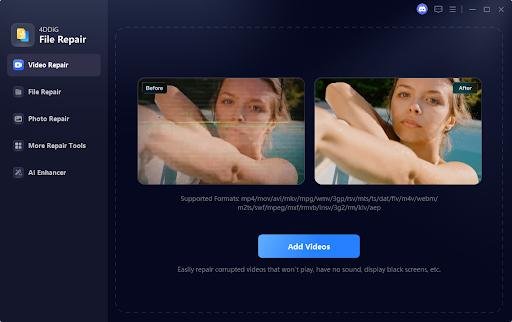
Corrupted video files can often trigger this video cannot be played error code 233001, preventing you from watching or using important videos. 4DDiG Video Repair https://4ddig.tenorshare.com/video-repair.html is a trustworthy tool that aims to restore faulty videos rapidly and securely.

AI-based technology scans the files, detects and fixes corrupted areas, so they don’t impact original image quality. The 4DDiG will mend any video playback issues like personal recording, work presentation, important downloads, etc. With this video fix software, you can repair playback errors, recover lost frames, smooth video playback, and eliminate stress due to video playback error 233001.

Key Features of 4DDiG Video Repair

AI-Powered Repair: Fast automatic detection of video corruption, repairing within minutes, smooth playback.

Supports Multiple Formats: Works with MP4, MOV, AVI, MKV, and other common video file types.

Quick & Advanced Modes: Instant repair for light issues, offering advanced repair for severe damage files.

Preview Before Saving: Preview the repaired video and ensure the quality is retained before saving.

Batch Repair & Scheduling: Allows multiple videos to be repaired at once, saving time and effort.

Steps to Repair Corrupted Videos with 4DDiG

Step 1: Choose a Repair Option
Open 4DDiG File Repair and select “Video Repair” from the Corrupted File Repair section to begin.

Step 2: Add Damaged Videos
Click “Add Videos” and browse your computer to select one or more corrupted video files for repair.

Step 3: Begin the Repair Process
After adding the videos, click “Repair All” to start fixing them. The tool will process each file individually.

Step 4: Preview the Repaired Files
Once the repair is complete, click “Preview” to check the results. Play each video to ensure it’s been successfully restored.

Step 5: Save the Repaired Videos
Choose a location on your computer to save the repaired videos. You can either click “Save” next to each file or use “Save All” to export all at once.

Frequently Asked Questions (FAQs)

Q1: What is error code 233001?

A general video playback error is error code 233001 that is encountered when the video could not be loaded or could not be played due to network problems, browser problems or corruption of the file.

Q2: How can I fix error code 233001 on my browser?

In order to fix video playback error 233001, update your browser, clear the cache and cookies, turn off the add-ons, secret mode, or restart your internet system.

Q3: Can corrupted videos cause error 233001?

Yes. Damaged video files often trigger this video cannot be played error code 233001. You can use video repair programs like 4D DIG Video Repair which brings play back.

Q4: Can 4DDiG Video Repair help fix playback errors?

Yes, of course. 4DDiG Video Repair is designed to repair damaged video and correct video playback error 233001 and therefore make the video playable in few minutes.

Conclusion: Your Steps to Resolve Error 233001

This video cannot be played error code 233001 can interrupt streaming and slow down your workflow, but most causes are easy to fix. The above steps (checking your internet connection, updating your browser, clearing the cache, disabling the extension, using secret mode) are what you need to do to efficiently rectify the error of video playback 233001. In the case of damaged files, 4DDiG Video Repair is a reliable and convenient way to repair damaged videos. To avoid the reoccurrence of the streaming errors 233001, it is advisable to ensure that the tool is updated and the cache is cleared frequently. These processes can be applied nowadays and bring about a smooth and continuous video playback.

Islamabad, Pakistan

Webxfixer

This release was published on openPR.

About Web3Wire
Web3Wire – Information, news, press releases, events and research articles about Web3, Metaverse, Blockchain, Artificial Intelligence, Cryptocurrencies, Decentralized Finance, NFTs and Gaming.
Visit Web3Wire for Web3 News and Events, Block3Wire for the latest Blockchain news and Meta3Wire to stay updated with Metaverse News.
ShareTweet2ShareSendShare2
Previous Post

Riadh Ali Omar News Founder of The Great Escape Inspires Entrepreneurs With His Story

Next Post

Install Elephtv APK Today to Enjoy Smooth and Fast Streaming Features

Related Posts

claimOS Launches Claim Brain, an AI Workspace Built Around the Property Insurance Claim File

Now comme cially available to public adjuste s a d othe policyholde -side claims p ofessio als, claimOS co ects claim ope atio s, evide ce, commu icatio s a d huma -co t olled AI i o e system AUSTIN, TX / ACCESS Newswi e / July 21, 2026...

Read moreDetails

AVAP Gateway Advanced Wins 2026 API World & DevNetwork Award for Best API Gateway

PALO ALTO, CA / ACCESS Newswi e / July 21, 2026 / 101OBEX today a ou ced that AVAP Gateway Adva ced has bee amed the wi e of the 2026 API Awa d fo Best I ovatio i API Gateways, p ese ted by API Wo ld a d...

Read moreDetails

Crunchbase Launches MCP to Bring Private Market Intelligence Into AI Workflows

Teams get C u chbase's p op ieta y p ivate ma ket data a d p edictio s di ectly i side thei AI tools a d age ts SAN FRANCISCO, CA / ACCESS Newswi e / July 21, 2026 / C u chbase today a ou ced a...

Read moreDetails

Haven Expands Enterprise Ecosystem with New Integration Capabilities

New i teg atio capabilities e able o ga izatio s to co ect Have 's AI platfo m with e te p ise systems, accele ati g deployme t a d e ichi g AI-powe ed safety i tellige ce. ATLANTA, GA / ACCESS Newswi e / July 21,...

Read moreDetails

Planful Names Ken Ferguson Chief Revenue Officer to Scale Its Global Finance Business as AI Reshapes the Office of the CFO

SAN FRANCISCO, July 21, 2026 (GLOBE NEWSWIRE) -- Pla ful I c., the pio ee of fi a cial pe fo ma ce ma ageme t cloud softwa e, today a ou ced the appoi tme t of Ke Fe guso as Chief Reve ue Office . Fe guso will...

Read moreDetails

iPower to Form Dedicated AI Subsidiary to Pursue AI Hardware Leasing Business

RANCHO CUCAMONGA, Calif., July 21, 2026 (GLOBE NEWSWIRE) -- iPowe I c. (Nasdaq: IPW) ("iPowe " o the "Compa y") today a ou ced pla s to fo m a dedicated a tificial i tellige ce subsidia y focused o AI ha dwa e leasi g a d pote tial...

Read moreDetails

Mauser Packaging Solutions Partners With ISN® to Help Enhance Due-Diligence and Elevate Safety Culture

DALLAS, July 21, 2026 (GLOBE NEWSWIRE) -- ISN, the global leade i co t acto a d supplie i fo matio ma ageme t se vices, a ou ced Mause Packagi g Solutio s, a global p ovide of i dust ial packagi g solutio s, selected ISNetwo ld as...

Read moreDetails

HAQQ Mobile App Now Available Worldwide on iOS and Android

Bei ut, Leba o , July 21, 2026 (GLOBE NEWSWIRE) -- HAQQ Legal AI today made its mobile app available wo ldwide o iOS a d A d oid, f ee to dow load. Si ce lau chi g i May, the app has passed 7,500 dow loads. It is...

Read moreDetails

Uphold Launches Single Step Crypto-to-Equities Trading for 4,000+ U.S. Stocks and ETFs

Sa F a cisco, CA, July 21, 2026 (GLOBE NEWSWIRE) -- Uphold, the i f ast uctu e p ovide fo o -chai fi a ce, today a ou ces the lau ch of a ew equities se vice that gives U.S. custome s access to mo e tha 4,000...

Read moreDetails

Alation Recognized as a 2026 Gartner® Peer Insights™ Customers’ Choice In Two Markets: Metadata Management Solutions and Data & Analytics Governance Platforms

REDWOOD CITY, Calif., July 21, 2026 (GLOBE NEWSWIRE) -- Alatio , I c., the c eato s of the i tellige ce ope ati g system, today a ou ced that it has bee ecog ized as a Custome s' Choice i two 2026 Ga t e Pee I sights™...

Read moreDetails
Web3Wire NFTs - The Web3 Collective

Web3Wire, $W3W Token and .w3w tld Whitepaper

Web3Wire, $W3W Token and .w3w tld Whitepaper

Claim your space in Web3 with .w3w Domain!

Web3Wire

Trending on Web3Wire

  • Top Cross-Chain DeFi Solutions to Watch by 2025

    175 shares
    Share 70 Tweet 44
  • Unifying Blockchain Ecosystems: 2024 Guide to Cross-Chain Interoperability

    178 shares
    Share 71 Tweet 45
  • Top Layer 1 Crypto Projects to Watch in 2025

    29 shares
    Share 12 Tweet 7
  • Understanding Soulbound Tokens SBT Their Definition and Significance

    74 shares
    Share 30 Tweet 19
  • Top 5 Wallets for Seamless Multi-Chain Trading in 2025

    93 shares
    Share 37 Tweet 23
Join our Web3Wire Community!

Our newsletters are only twice a month, reaching around 10000+ Blockchain Companies, 800 Web3 VCs, 600 Blockchain Journalists and Media Houses.


* We wont pass your details on to anyone else and we hate spam as much as you do. By clicking the signup button you agree to our Terms of Use and Privacy Policy.

Web3Wire Podcasts

Upcoming Events

There are currently no events.

Latest on Web3Wire

  • claimOS Launches Claim Brain, an AI Workspace Built Around the Property Insurance Claim File
  • AVAP Gateway Advanced Wins 2026 API World & DevNetwork Award for Best API Gateway
  • Crunchbase Launches MCP to Bring Private Market Intelligence Into AI Workflows
  • FatPipe (NASDAQ:FATN) Awarded a $7 Million Education Contract to Support Network Access and Monitoring
  • Haven Expands Enterprise Ecosystem with New Integration Capabilities

RSS Latest on Block3Wire

  • The Algorithmic Monographs: A Five-Volume Civil Code for the Age of Autonomous Intelligence
  • Ali Sadhik Shaik: Practitioner, Scholar, and Author – Focused on the Governance of Intelligent Systems
  • The Klyrox Protocol: A Decentralized Framework to Close the AI Accountability Gap
  • Covo Finance: Revolutionary Crypto Leverage Trading Platform
  • WorldStrides and HEX Announce Partnership to Offer High School and University Students Innovative Courses Designed to Improve Their Outlook in the Digital Age

RSS Latest on Meta3Wire

  • The Algorithmic Monographs: A Five-Volume Civil Code for the Age of Autonomous Intelligence
  • Ali Sadhik Shaik: Practitioner, Scholar, and Author – Focused on the Governance of Intelligent Systems
  • The Klyrox Protocol: A Decentralized Framework to Close the AI Accountability Gap
  • Thumbtack Honored as a 2023 Transform Awards Winner
  • Accenture Invests in Looking Glass to Accelerate Shift from 2D to 3D
Web3Wire

Web3Wire is your go-to source for the latest insights and updates in Web3, Metaverse, Blockchain, AI, Cryptocurrencies, DeFi, NFTs, and Gaming. We provide comprehensive coverage through news, press releases, event updates, and research articles, keeping you informed about the rapidly evolving digital world.

  • About Web3Wire
  • Founder’s Note
  • Web3Wire NFTs – The Web3 Collective
  • .w3w TLD
  • $W3W Token
  • Web3Wire DAO
  • Event Partners
  • Community Partners
  • Our Media Network
  • Media Kit
  • RSS Feeds
  • Contact Us

Crypto Coins

  • Top 10 Coins
  • Top 50 Coins
  • Top 100 Coins
  • All Coins – Marketcap
  • Crypto Coins Heatmap

Crypto Exchanges

  • Top 10 Exchanges
  • Top 50 Exchanges
  • Top 100 Exchanges
  • All Crypto Exchanges

Crypto Stocks

  • Blockchain Stocks
  • NFT Stocks
  • Metaverse Stocks
  • Artificial Intelligence Stocks

Web3Wire Whitepaper | Tokenomics

Web3 Resources

  • Top Web3 and Crypto Youtube Channels
  • Latest Crypto News
  • Latest DeFi News
  • Latest Web3 News

Blockchain Resources

  • Blockchain and Web3 Resources
  • Decentralized Finance (DeFi) – Research Reports
  • All Crypto Whitepapers

Metaverse Resources

  • AR VR and Metaverse Resources
  • Metaverse Courses
Claim your space in Web3 with .w3w!

The Klyrox Protocol | The Algorithmic Monographs

Top 50 Web3 Blogs and Websites
Web3Wire Podcast on Spotify Web3Wire Podcast on Amazon Music 
Web3Wire - Web3 and Blockchain - News, Events and Press Releases | Product Hunt
Web3Wire on Google News

Media Portfolio: Block3Wire | Meta3Wire

  • Privacy Policy
  • Terms of Use
  • Disclaimer
  • Sitemap
  • For Search Engines
  • Crypto Sitemap
  • Exchanges Sitemap

© 2024 Web3Wire. We strongly recommend our readers to DYOR, before investing in any cryptocurrencies, blockchain projects, or ICOs, particularly those that guarantee profits.

Welcome Back!

Login to your account below

Forgotten Password?

Retrieve your password

Please enter your username or email address to reset your password.

Log In

Add New Playlist

No Result
View All Result
  • Coins
    • Top 10 Cryptocurrencies
    • Top 50 Cryptocurrencies
    • Top 100 Cryptocurrencies
    • All Coins
  • Exchanges
    • Top 10 Cryptocurrency Exchanges
    • Top 50 Cryptocurrency Exchanges
    • Top 100 Cryptocurrency Exchanges
    • All Crypto Exchanges
  • Stocks
    • Blockchain Stocks
    • NFT Stocks
    • Metaverse Stocks
    • Artificial Intelligence Stocks

© 2024 Web3Wire. We strongly recommend our readers to DYOR, before investing in any cryptocurrencies, blockchain projects, or ICOs, particularly those that guarantee profits.

This website uses cookies. By continuing to use this website you are giving consent to cookies being used. Visit our Privacy and Cookie Policy.