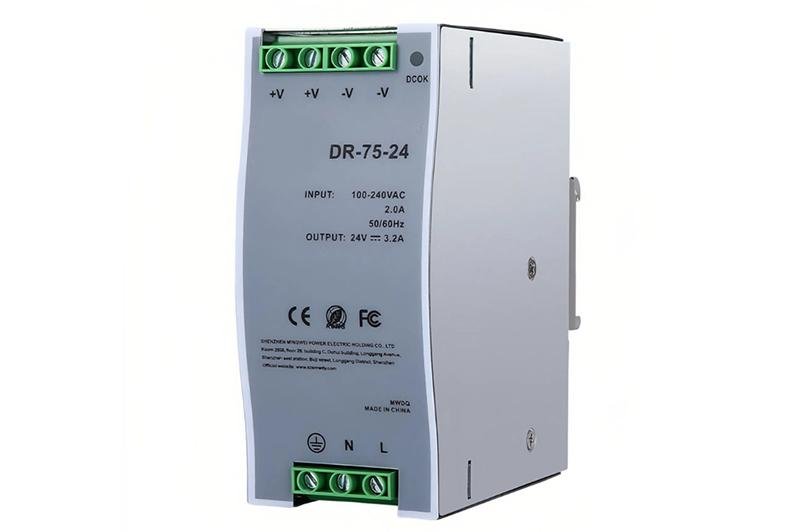
DIN rail power supplies are essential components in industrial automation, electrical control systems, and various industrial applications, thanks to their compact design, stable performance, and easy installation. As a professional power supply manufacturer with 15 years of R&D and production experience, Huyssen has optimized the structural design of our DIN rail power supplies (covering 5V, 12V, 15V, 24V, 36V, 48V voltage specifications) to ensure compatibility with standard DIN rails and simplify the installation process. This guide will walk you through the 5 core steps of installing DIN rail power supplies, along with professional tips and quality assurance information to help beginners complete the installation safely and efficiently.
Image: https://ecdn6.globalso.com/upload/p/4122/image_other/2026-01/img.jpg
Pre-Installation Preparation: Check Equipment and Environment
Before starting the installation, adequate preparation is crucial to avoid safety hazards and installation failures. Here’s what you need to do:
* Verify Product Compatibility: Confirm that the model of the DIN rail power supply matches your system requirements (e.g., input voltage, output current, power rating). Huyssen’s DIN rail power supplies are marked with clear parameters on the product case for easy identification. If you need custom specifications, our R&D team is ready to provide tailored solutions.
* Inspect Product Integrity: Check if the power supply case, terminals, and power cords are intact without damage or loose parts. All Huyssen products undergo 10 strict quality inspection processes, including aging tests and full-automatic final testing, before leaving our factories in Shenzhen and Dongguan, ensuring reliable quality.
* Prepare Tools and Accessories: Prepare necessary tools such as a screwdriver, wire stripper, and cable ties. Ensure that the DIN rail (standard TS35/7.5 or TS35/15) is firmly installed on the electrical cabinet, and the installation environment meets the requirements (temperature: -20 degrees C to 60 degrees C, dry, dust-free, away from flammable and corrosive substances).
* Safety First: Turn off the main power supply of the system to prevent electric shock during installation. It is recommended to wear insulating gloves for additional protection.
Step 1: Mount the DIN Rail Power Supply on the Rail
The mounting process of Huyssen’s DIN rail power supplies is designed to be user-friendly, requiring no professional tools for basic installation:
* Align the mounting clip at the bottom of the power supply with the top edge of the DIN rail.
* Press the power supply firmly against the rail until you hear a “click” sound, indicating that the mounting clip has locked onto the rail.
* Gently shake the power supply to confirm it is securely fixed and will not slide or fall off. For heavy-duty applications or high-vibration environments, you can use additional fixing screws (provided in Huyssen’s accessory package) to reinforce the installation.
Tip: Huyssen’s DIN rail power supplies feature a compact and lightweight design, which not only saves space in the electrical cabinet but also reduces the load on the DIN rail, ensuring long-term stable operation.
Step 2: Connect the Input Power Cord
The input power cord connects the power supply to the mains or DC power source. Follow these steps to ensure correct connection:
* Identify the input terminals: The input terminals of the power supply are usually marked with “L” (live wire), “N” (neutral wire), and “PE” (ground wire) for AC input, or “Vin+” and “Vin-” for DC input. Refer to the product manual for details.
* Strip the insulation: Use a wire stripper to strip 6-8mm of insulation from the end of the input power cord, avoiding damage to the copper core.
* Insert and fix the wires: Insert the live wire into the “L” terminal, the neutral wire into the “N” terminal, and the ground wire into the “PE” terminal (grounding is mandatory for safety). Tighten the terminal screws with a screwdriver to ensure the wires are firmly fixed and there is no loose contact.
* Check the connection: Double-check that the wire connections are correct and that the insulation layer is not pressed into the terminal to prevent short circuits.
Step 3: Connect the Output Power Cord
The output power cord transmits the stabilized power to the load (e.g., sensors, actuators, controllers). The operation steps are similar to the input connection, but pay attention to the polarity:
* Identify the output terminals: The output terminals are marked with “Vout+” (positive pole) and “Vout-” (negative pole). Ensure that the polarity matches the load requirements to avoid damaging the load or the power supply.
* Strip the insulation and connect the wires: Strip the insulation from the output power cord, insert the positive wire into “Vout+” and the negative wire into “Vout-“, then tighten the terminal screws.
* Arrange the wires: Use cable ties to organize the input and output wires, keeping them neat and avoiding entanglement. This helps with heat dissipation and future maintenance.
Step 4: Perform Post-Installation Inspection
Before turning on the power, conduct a comprehensive inspection to eliminate potential issues:
* Recheck all wire connections: Ensure that input and output wires are connected to the correct terminals, and the screws are tightly fastened.
* Check the installation environment: Confirm that there are no obstacles around the power supply, and the heat dissipation vents are not blocked (Huyssen’s DIN rail power supplies are designed with optimized heat dissipation structures to ensure efficient heat dissipation).
* Verify the load connection: Ensure that the load is correctly connected and that the load current does not exceed the maximum output current of the power supply.
Step 5: Power On and Test the System
After completing the inspection, you can turn on the power and test the system:
* Turn on the main power supply and check the power supply indicator: The power indicator (usually green) on the power supply should light up, indicating that the power supply is working normally.
* Test the output voltage: Use a multimeter to measure the output voltage of the power supply. The measured value should be within the specified range (Huyssen’s DIN rail power supplies have high voltage accuracy, with an error of less than plus-minus 2%).
* Test the load operation: Start the load system and observe if it operates stably. Check if the power supply has abnormal heat generation, noise, or voltage fluctuations. If any issues occur, turn off the power immediately and recheck the installation and connections.
Professional Tips for Long-Term Stable Operation
* Regular Maintenance: Clean the dust on the power supply and heat dissipation vents regularly to ensure good heat dissipation. Huyssen recommends conducting a comprehensive inspection every 6 months.
* Avoid Overload: Do not allow the load current to exceed the maximum output current of the power supply for a long time. If you need to expand the load, please consult our technical team to select a suitable power supply model.
* Environmental Protection: Keep the installation environment dry and well-ventilated. Avoid installing the power supply in areas with high temperature, humidity, or strong electromagnetic interference.
About Huyssen: Your Reliable DIN Rail Power Supply Manufacturer
Huyssen Power , founded in 2011, is a professional power supply manufacturer with two production bases in Shenzhen and Dongguan, China. We specialize in R&D and production of various power supplies, including DIN rail power supplies, switching power supplies, DC power supplies with over 1000 product models available. All our products have obtained more than 20 international certifications (such as CE, BIS, ROHS, FCC) and meet global safety standards.
If you encounter any problems during the installation or use of DIN rail power supplies, or if you need custom power supply solutions, please feel free to contact us:
WhatsApp &Phone: +86-13570841067 +86-(0)755-32909068
We promise to respond to your inquiry within 24 hours and provide professional technical support and high-quality products.
Media Contact
Company Name: Shenzhen Huyssen Technology Co., Ltd.
Email:Send Email [https://www.abnewswire.com/email_contact_us.php?pr=how-to-install-din-rail-power-supplies]
Country: China
Website: https://www.huyssenpsu.com/
Legal Disclaimer: Information contained on this page is provided by an independent third-party content provider. ABNewswire makes no warranties or responsibility or liability for the accuracy, content, images, videos, licenses, completeness, legality, or reliability of the information contained in this article. If you are affiliated with this article or have any complaints or copyright issues related to this article and would like it to be removed, please contact retract@swscontact.com
This release was published on openPR.