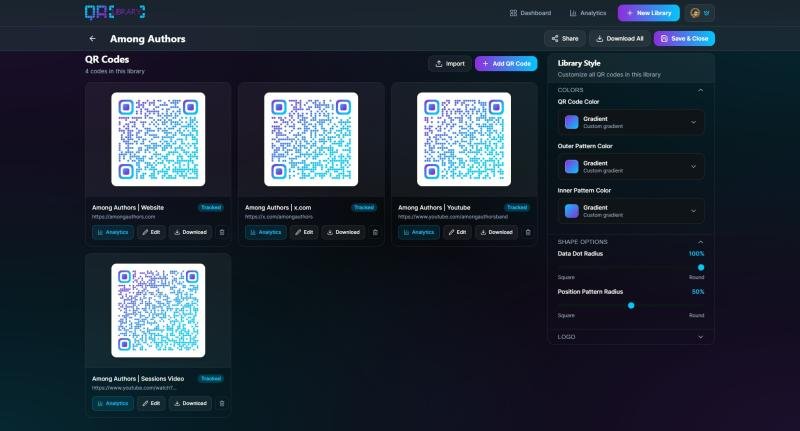
qr-library.com’s bulk qr-code styling interface
In a digital landscape where simply opening a menu requires a data plan and a minor existential crisis, a new utility called qr-library.com has launched to do one thing reasonably well: create and save QR codes without asking for your soul, or your email address, in return.
Most QR code generators operate on a model of “bait and switch,” offering a free code and then holding it hostage behind a subscription paywall two weeks later. QR Library takes a different, perhaps radical, approach. It assumes that if you want to turn a URL into a square barcode, you should just be able to do that.
The “Revolutionary” Feature: It Just Stays on Your Computer
The platform introduces “QR Libraries,” a feature that allows users to generate multiple codes and organize them into folders. Libraries are styled together so no need to open each QR code individually and redo your work. This is not groundbreaking technology; it is simply digital hygiene.
No Login Required: Because frankly, nobody needs another password to remember.
Local Storage Only: By default, data is stored in your browser, not on a cloud server. This means we literally cannot steal your data even if we wanted to, which we don’t.
It Is Free: It creates the codes. You download them. That is the entire transaction.
The “Pro” Version (Which You Probably Don’t Need)
For the tiny fraction of the population who actually enjoy looking at graphs, there is a Pro version. It offers cloud storage, allowing you to access your codes from multiple devices, and detailed analytics to see exactly how many people scanned your Wi-Fi code.
“I built QR Library because I was tired of the internet making simple things difficult,” said Jason, the creator of the platform. “The free version is perfectly adequate for 99% of humans. It organizes your codes and respects your privacy. However, if you have a burning desire to store data in the cloud or analyze scan metrics, the Pro version exists to take your money. I won’t stop you, but I will remind you that the free version is very good.”
The tool supports URLs, plain text, Wi-Fi credentials, and vCards. It works on desktop and mobile, provided you have a browser and a modicum of patience.
For a QR code experience that is pleasantly boring and functional visit: https://qr-library.com
Or skip the landing page marketing jargon and go straight to the web application:
https://qr-library.com/app/
Qr Library
7912 35th Ave SW
Seattle, WA 98126
Jason@qr-library.com
QR Library is a web-based utility for people who like organization and dislike unnecessary friction. It leverages local browser storage to provide a privacy-first way to manage QR codes, with a completely optional upgrade for advanced features like analytics and cloud storage.
This release was published on openPR.